
How do I Delete a Donation?
Select the donation you would like to delete. Select 'Delete' from the 'Status' drop-down field. To permanently delete the donation, click the trashcan.
Deleting is a two-step process to avoid accidental deletions.

How do I duplicate or reuse a donation?
Select 'Library Donation' and the donation you want to duplicate or reuse. Select 'Donation, Duplicate Donation' from the menu. Edit the donation as needed.
Once a donation is in an auction, specific bids might be associated with the donation. If you switch auctions for that donation, the bids are no longer in that auction. Therefore, it is better to duplicate the donation and associate the duplicate with the new auction.
However, if nobody made a bid on that donation, there is no objection to switching the donation from one auction to another.
How do I create a new donation?
Select your Auction. Select 'Donations' on the right at the top. Click the plus sign.
Name your donation, fill in a description, the number of donation (usally 1), the 'Market value', the 'Bid starts at' value. If you leave your cursor over the 'Bid step increment', Pearl Bids will suggest a value for 'Bid step increment.' Your goal should be to reach the market value within a few steps. Finally associate the donation with the donor.
Alternatively you can create a Donation by selecting 'Library Donations' and click the plus sign. You will have to associate this donation with an auction as well.
How do I create a Flat Rate Item?
To create an item that is available to multiple bidders at one price - such as a dinner that allows for 8 couples, a wine pull, an event t-shirt...
Go to the Donations window.
Select the tab, Donation Type - Then choose the option for Each bidder is a winner (all for the same price). You can even indicate how many people are allowed to bid on the item.

How do I create a catalog?
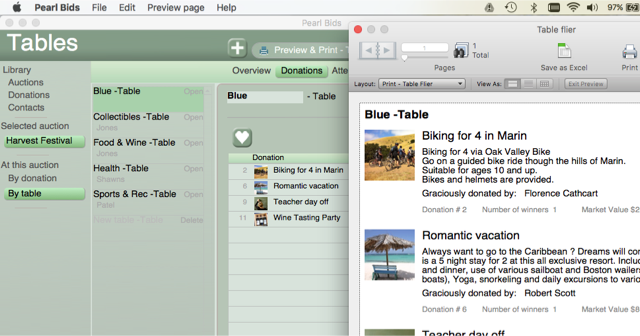
1. In your Pearl Bids program, have the auction selected in the left hand column and Donations chosen in the menu bar under the heading.
2. In the left hand column, you will then select By Table under the At this auction category.
3. Select the each of the tables at the from the center column.
4. In the top “printer bar,” select Preview & Print - Table flier

This will provide you with pages for your catalog.
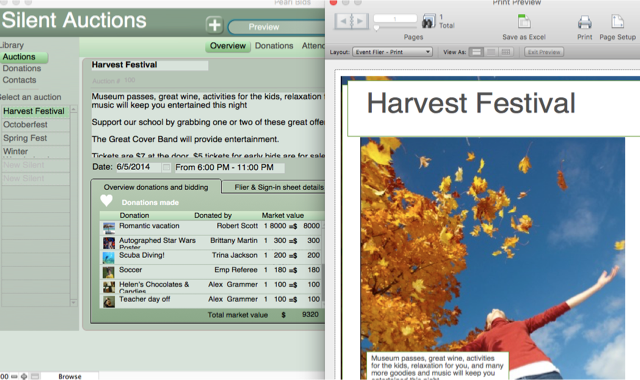
5. In order to print a cover sheet for your catalog, choose Overview from the menu bar under the heading.
6. You can select to preview and print a flyer for your auction.
How do I associate a Donation with a Donor?
Select your donation. Click on the 'Donated by'field and select the donor contact.
If the donor does not have a contact yet, you can create a new contact by clicking the '+' plus sign button on top.
How Do I Create A 'Raise the Paddle' Item?
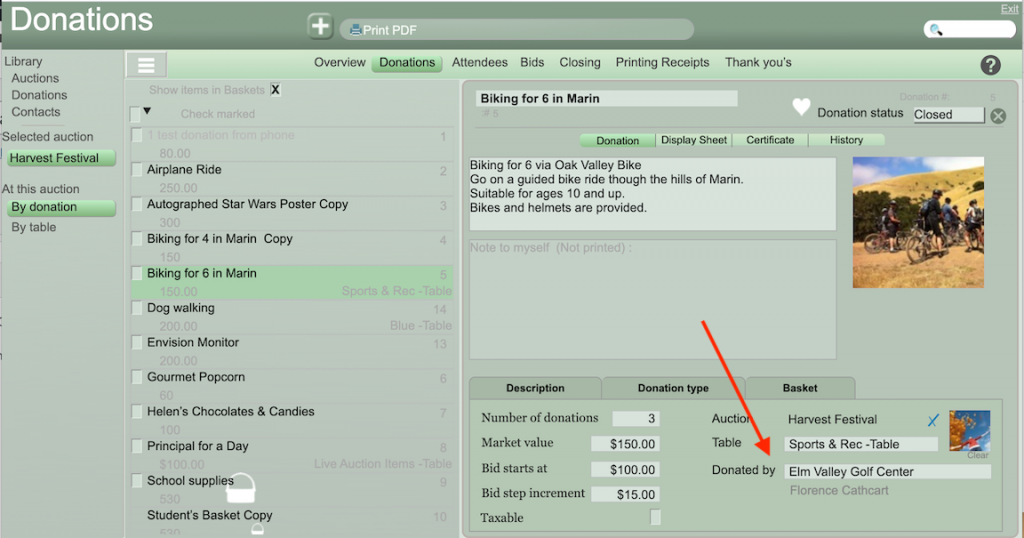
How Do I Associate a Donation with a Donor?
Select your donation. Click on the 'Donated by' field and select the donor contact.
If the donor does not have a contact yet, you can create a new contact by clicking the '+' plus sign button on top.
How Do I Add Lines to my Bid Sheets?
The bid sheets are constructed with the optimal number of lines for the maximum return.
Research has shown that the maximum bids are reached within six lines.
If you are finding that you need more lines, you may want to raise your base price or increase the bidding step increments.
The online version also provides the option of printing out blank bid sheets, which can be used as an optional second sheet if desired.
Are Description Fields Limited in Length?
You may enter more information in a description or title field than the size of the original text box. The box will expand as you type, allowing you to enter additional information.
Since you wish for all of the different components to show on the bidding sheet when printed, only the information from the original text box will be printed. The other information will remain in Pearl Bids for your future reference.